
Samsung’s Find My Mobile service is safe
Byadmin
Find My Phone Samsung, Samsung Find My Mobile, Find my Samsung
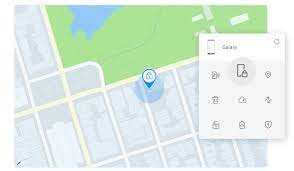
Recently, there had been reviews that Samsung`s Find My Mobile provider became prone to positive hack attempts. Losing a smartphone is one of the most stressful experiences in the modern digital world. Fortunately, phone manufacturers like Samsung offer robust and secure tools to help users track their devices. One of the most reliable among them is Samsung’s Find My Mobile service. But many users often wonder: Is it truly safe?
What is Samsung Find My Mobile?
Samsung Find My Mobile is a free service offered to Samsung smartphone users that allows them to locate, lock, or erase data from their device remotely. It works through a Samsung account and can track a lost or stolen device in real-time, as long as the device is connected to the internet.
Users can access the service by visiting the Find My Mobile website and logging in with their Samsung credentials. From there, they can:
- Locate the phone on a map
- Ring the device loudly, even if it's on silent
- Lock the device and display a custom message
- Back up data remotely
- Erase the phone completely if recovery isn't possible
Is Samsung Find My Mobile Safe?
Yes, Samsung Find My Mobile is safe and secure, and here’s why:
1. Two-Factor Authentication (2FA)
Samsung uses two-factor authentication for account access, meaning even if someone has your password, they won’t be able to access your Find My Mobile account without your second verification method.
2. Encrypted Communication
All commands sent to your phone—such as location tracking, locking, or wiping—are encrypted and secure. This ensures that no unauthorized third party can intercept or misuse the data.
3. Authorization Required
You must log into your Samsung account to use Find My Mobile. Without credentials, the tool is inaccessible, even to people who physically possess the phone.
4. Remote Data Wipe
In case your phone is permanently lost or stolen, you can erase all data remotely. This feature protects sensitive information like banking apps, personal photos, and documents from misuse.
How to Enable Samsung Find My Mobile
Follow these simple steps to enable Samsung Find My Mobile:
- Go to Settings on your Samsung phone.
- Tap on Security and Privacy > Find My Mobile.
- Turn on the switch for Find My Mobile.
- Ensure your Samsung account is linked and logged in.
- Enable Remote Unlock, Send Last Location, and Offline Finding for better tracking.
Once enabled, you can log into Find My Mobile from any browser to start tracking or managing your device.
Comparison with Apple’s Find My iPhone
Samsung users aren’t the only ones with remote tracking capabilities. iPhone users can access similar features using Find My iPhone. Here’s how they compare:
| Feature | Samsung Find My Mobile | Apple Find My iPhone |
| Remote Lock/Wipe | ✅ Yes | ✅ Yes |
| Ring Phone Remotely | ✅ Yes | ✅ Yes |
| Works Offline | ✅ Yes (Offline finding) | ✅ Yes (Last known location) |
| Requires Manufacturer ID | ✅ Samsung ID | ✅ Apple ID |
| Third-party support | ❌ No | ✅ Limited via iCloud |
Both platforms offer similar safety and tracking features, though they work exclusively on their respective devices. If you’ve lost your iPhone, don’t forget to try iphone imei check and track lost iPhone options as well, available at .
Can Verizon Users Use This?
Yes, even if you're a Verizon customer using a Samsung device, you can still use Samsung Find My Mobile. Additionally, Verizon also provides its own tracking options. However, for broader compatibility and features like remote wipe and backup, Samsung’s own platform is recommended.
If you're on Verizon and use an iPhone, you can also run a Verizon IMEI check or an iPhone IMEI check at to get more details about your lost device.
Tips to Improve Mobile Security
While Samsung Find My Mobile is a powerful tool, it's still important to take basic steps to protect your device before you lose it:
- Always enable Find My Mobile and related features.
- Use a strong password or biometric lock on your phone.
- Back up your phone regularly, especially contacts and important files.
- Install software updates as they patch security vulnerabilities.
- Don’t share your Samsung or Google account credentials with others.
Recovering Your Lost Samsung Phone
If your Samsung phone is lost or stolen, here's a step-by-step guide on what to do:
- Immediately visit Find My Mobile.
- Log into your Samsung account.
- Click on your registered device to see its last known location.
- Choose to Ring, Lock, or Erase depending on your situation.
- If location is off, wait for the “Send Last Location” feature to update.
- Report your lost phone to your carrier and consider blocking your SIM.
Also, for extra confirmation or support, you can perform an IMEI check (iPhone or Android) on to validate device information or status.
Final Thoughts
In today’s world where smartphones carry nearly every detail of our lives, having a reliable and secure tracking system is not optional—it’s essential. Samsung Find My Mobile delivers both safety and utility, offering peace of mind if your phone is misplaced or stolen.
Whether you're using a Samsung Galaxy or an iPhone, tools like Find My Mobile or track lost iPhone services, along with IMEI checking through trusted platforms like , can help you recover your device and safeguard your data.
Don’t wait until it’s too late—enable Find My Mobile today and stay one step ahead.
2 Comments
Tworzenie konta na Binance says:
February 27, 2025 at 9:01 pm
Thanks for sharing. I read many of your blog posts, cool, your blog is very good.
Tworzenie konta na Binance says:
February 27, 2025 at 9:01 pm
Thanks for sharing. I read many of your blog posts, cool, your blog is very good.
Leave a Reply
Your email address will not be published. Comments are reviewed before they appear.